Grounding Cables: Reliable ESD Protection for Every Workspace
Ensure a clear path to ground with our heavy-duty ESD Grounding Cables. Specifically designed for compatibility with the Elimstat 5300 ANSI/ESD Safe Workstation, these cables provide a secure, low-profile connection that keeps your environment compliant and your team safe.
- Tri-Free Safety Design: The rounded, low-profile head sits flush against the mat, significantly reducing trip hazards in high-traffic areas.
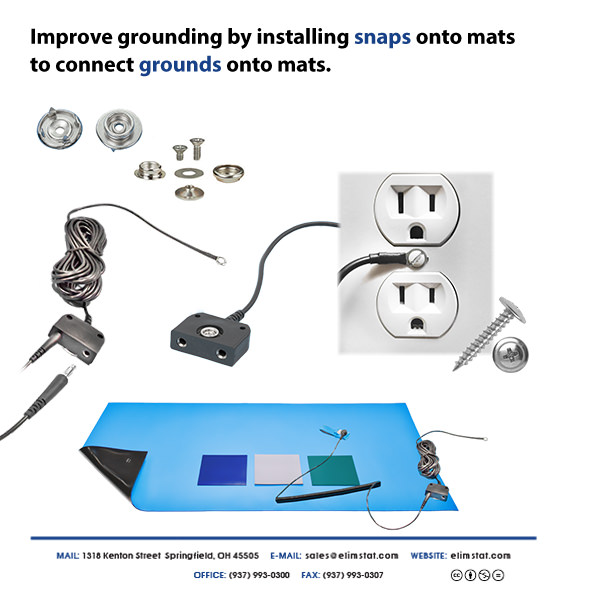
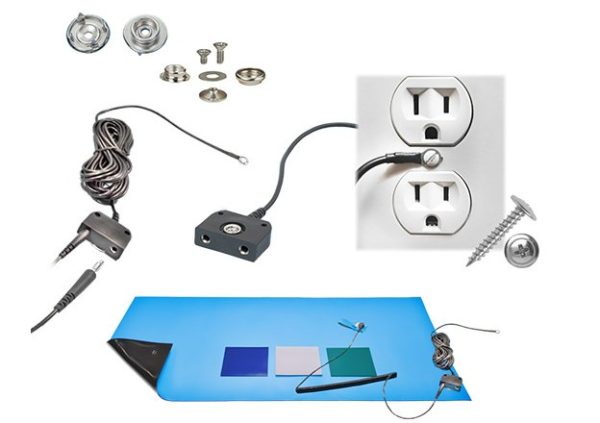
- Universal Fit: The bottom socket is engineered to snap securely onto standard snaps for mats , ensuring a consistent connection that won’t tug loose.
- Extended Reach: Each 15-foot cable gives you the flexibility to reach distant ground points without straining the wire.
- Simple Installation: Features a terminal eyelet for easy, permanent attachment to the center screw of a grounded electrical outlet.
Pro Tip: For the most reliable connection, we recommend installing the snaps directly into your 5700 Series Anti Static Mat before connecting the ground cord.
Installation & Setup Guide
Proper grounding is essential for the effectiveness of your ESD workstation. Follow these steps to ensure a low-resistance path to ground.
Step 1: Installing the Mat Snaps
Before connecting the cable, you must have a secure attachment point on your mat.
-
Positioning: Choose a corner of your 5700 Series Anti Static Mat that is closest to your grounded power outlet.
-
Attachment: Use a snap tool to install the 10mm female snaps through the mat material. Ensure the snap is tight to maintain electrical continuity.
Step 2: Connecting to Ground
Our cables are designed to use the building’s electrical ground for simplicity and reliability.
-
The Eyelet: Remove the center screw from a standard 3-prong AC wall outlet faceplate.
-
Secure: Place the cable’s terminal eyelet over the screw hole and re-insert the screw. Tighten until the eyelet is held firmly against the faceplate.
-
Alternative: If using a “Common Point Ground” (see diagram), the eyelet can be attached to a dedicated ground bus bar or the frame of the Elimstat 5300 Workstation.
Step 3: The Final Connection
-
Snap-on: Take the rounded “Tri-Free” end of the cable and press the socket firmly onto the mat snap. You should hear a distinct “click.”
-
Test: We recommend using an ESD mat tester to verify that the resistance from the mat surface to the ground point is within the required range (typically $< 1 \times 10^9$ ohms).

What is a Common Point Ground?
As shown in the technical diagrams above, a Common Point Ground allows you to ground both your Table Matting and your operator wrist strap to the same physical location. This ensures that everything (and everyone) at the station is at the same electrical potential, eliminating the risk of discharge.






Reviews
There are no reviews yet.